Example
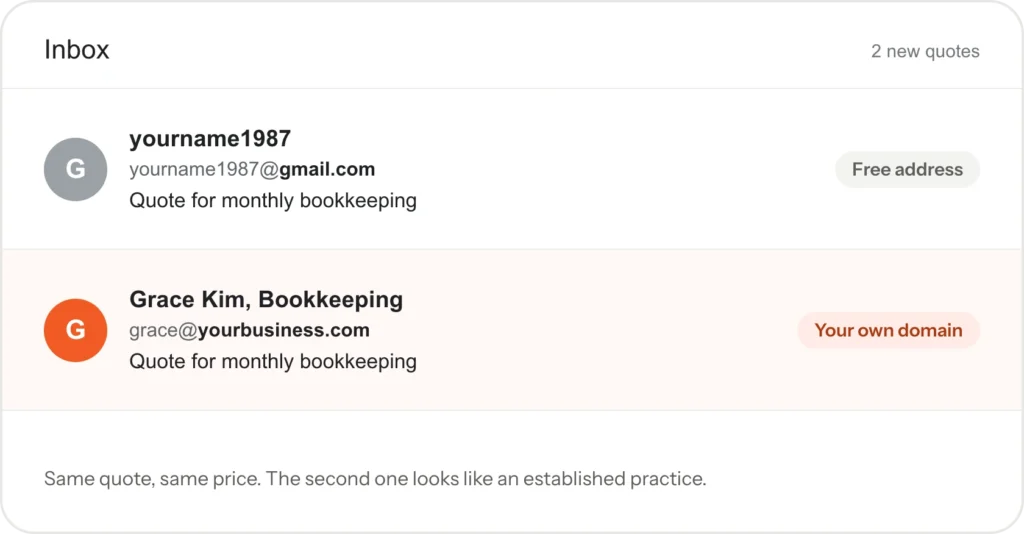
Picture a bookkeeper with eleven years of experience and a full client list. Call her Grace. For most of those years she has sent proposals from a free email address she opened in college, with a number on the end. Nobody ever told her that a professional email address was part of looking established.
Then a dental office manager replies to one of her quotes with a polite question.
Is Grace still doing this on the side, or full time?
The quote was good. The fee was fair. The email address had told a different story before anyone read a line.
That one question is what this article is about.
What is a professional email address?
It is an email address that ends in your own domain name instead of a free provider’s. Your domain is the name you own on the web, the same one in your website address. So instead of a free address with a number on the end, Grace would write from one that ends with the name of her practice.
You can have several on one domain: one for you, one for each team member and shared ones such as info@ or bookings@.
Why does a free email address cost you trust?
Customers judge a business on small signals before they judge the work. A free address on a quote or an invoice quietly suggests a one-person side job, even when that is not true. Competitors who email from their own domain look more settled before the customer reads the first sentence.
In bookkeeping, as in many services, clients send private documents. The dental office manager was not being rude. She wanted to know that Grace’s practice would still be there next year. An address on Grace’s own domain would have answered that before she had to ask.
There is a practical side as well. A free address belongs to the account holder, not the business. If a team member leaves, their address and every customer conversation in it can leave too. Addresses on your own domain stay with the business.
Key point: Your email address is often the first thing a client sees. It should look like the business you have built.
Trust is one reason to switch. The other is making sure your emails arrive at all.
Does a professional email address help emails reach the inbox?
It gives you control over the settings that decide it. Email providers check whether a message really comes from the domain it claims to come from. Three records on your domain answer that question:
- SPF lists the servers allowed to send email for your domain.
- DKIM adds a digital signature to each message, so the receiver can tell it was not changed on the way.
- DMARC tells receiving providers what to do with a message that fails those checks.
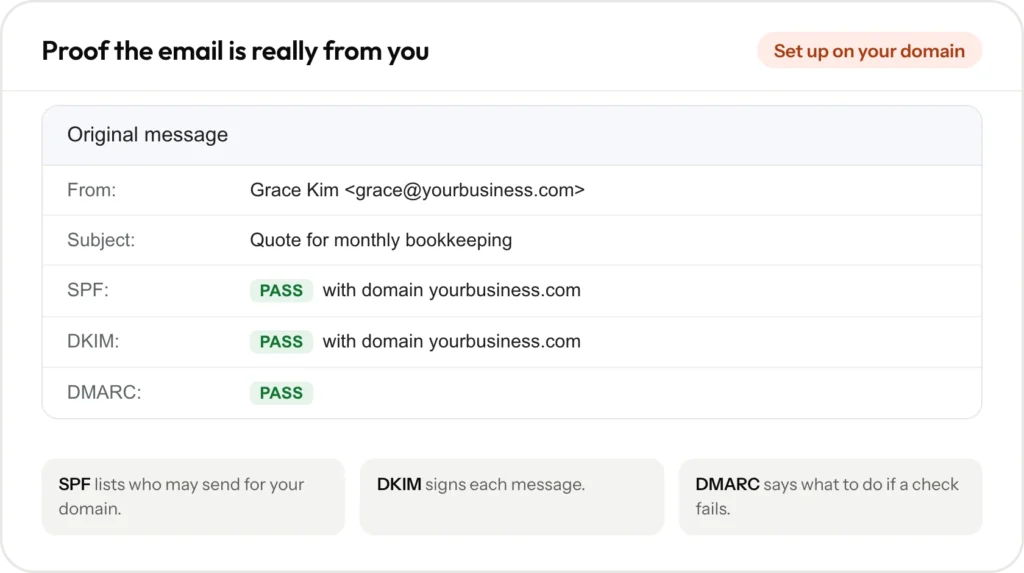
Gmail’s email sender guidelines say all senders must set up SPF or DKIM. Senders who send more than 5,000 messages a day to Gmail accounts must set up all three. When these records are missing on a business domain, emails are more likely to land in spam. That is a common reason quotes go unanswered without anyone knowing why.
When Grace moved to her own domain, these records became something to set up on day one, not an afterthought.
What does a business email address cost?
Less than Grace expected. You need a domain, which you may already have for your website. Then you need email hosting, and there are three common choices:
- Email from your hosting provider. Often included with your website hosting. Enough for most small teams.
- Google Workspace. Charged per user. It uses the familiar Gmail screens and adds shared calendars and documents.
- Microsoft 365. Charged per user. It suits teams that already live in Outlook, Word and Excel.
The provider bills you directly, so the account is yours. Prices change, so check each provider’s current plans before you choose.
Key point: The switch costs little. The free address can cost you clients without you ever finding out.
How do you switch without missing any emails?
Grace’s biggest worry was losing messages from long-standing clients. The order below prevents that.
- Choose a provider based on how your team works.
- Create the addresses you need on your own domain, in your own account.
- Add the delivery records, SPF, DKIM and DMARC, then send test messages to check they land in the inbox.
- Connect your phone and computer, and add a branded signature with your name, role, phone number and website.
- Forward your old address to the new one, so nothing sent there is lost.
- Update your address everywhere customers see it: your website, Google Business Profile, invoices, quotes and directory listings.
How did Grace make the switch?
Grace picked email from her hosting provider, because her practice is just her and one part-time assistant. She created three addresses: one for herself, one for her assistant and one shared address for documents. The delivery records went onto the domain the same day, and a test message to each major provider landed in the inbox.
She kept the old free address for six months, forwarding everything to the new one. In that time she replied only from the new address, so regular clients picked it up without a formal announcement. Her quote template, invoices, website contact page and Google Business Profile all switched on the same afternoon.
Example
Picture the next prospective client opening one of Grace’s quotes.
The address matches the name on the letterhead, the website and the map listing. Nothing about her work has changed. The question about whether she does this full time simply never comes up.
Why is email part of your brand?
Branding is not only a logo. It is how your business looks and sounds everywhere a customer meets you. Your email address and signature show up in every quote, reminder and thank-you note you send, often more than your website does. When your name, colors and contact details match across your website, your listings and your inbox, you look like the safer choice.
If you are planning a new website at the same time, our guide to what a small business website costs covers the bigger picture.
Business email setup is included in every Presence Build, set up in your own account. See how our business email setup works and what we build for finance and accounting firms. Prices are on our pricing page, or book a free 30-minute call and we will check your current setup with you.
Frequently asked questions
Yes, for a while. Forward it to your new address so you do not miss anything, and reply from the new one so customers switch over naturally.
You need a domain, not a website. Most businesses use the same domain for both, so customers see one name everywhere.
Usually because the records that prove an email comes from your domain are missing or wrong. Adding SPF, DKIM and DMARC, then testing, fixes most cases.
For most small teams, email from your hosting provider is enough. If you need shared calendars and documents, Google Workspace or Microsoft 365 fit better.
Yes. Business email setup is part of every Presence Build, including the delivery records, your devices and your signature.