Example
Picture an agent three years into the job. Call her Jordan. A past client’s neighbor recommends her to a couple who are about to sell, and the couple do what almost everyone does next. They search her name. The search turns up no real estate agent website of her own.
What they find is a profile on her brokerage’s site. She is one face in a grid of forty, with a stock headshot and the office phone number.
The next result is another agent’s site. It has a guide to the couple’s own neighborhood and a form that offers to value their home. They book that agent instead.
The referral did its job. The search undid it.
That gap is what your own website closes. Here is what Jordan’s site needed, in the order the couple would have looked for it.
Why does a real estate agent need their own website?
Jordan’s first reaction was that she already had one. The brokerage page had her name on it, after all.
But a brokerage profile and the big listing portals are not yours. On a portal, your listing sits beside other agents’ ads. On a brokerage site, you are one face in a grid. Neither says much about how well you know a street, a school district or a type of home.
Your own site does three jobs those pages cannot. It shows sellers you understand their market. It keeps buyers’ inquiries coming to you instead of a portal. And it moves with you. If your domain, hosting and website sit in your own accounts, they come along if you ever change brokerages.
Key point: A brokerage page belongs to the brokerage. Your own domain stays with you for your whole career.
So what goes on it? Start with the questions the couple had in their heads.
What pages should a real estate agent website include?
The couple wanted to know three things. Does this agent know our area? Has she sold homes like ours? How do we reach her? Each page below answers one of those questions. Real estate is the industry we have built for most, with 36 websites so far, and these pages show up in nearly every one.
A homepage that says who you serve and where
The top of the page has a few seconds to answer three questions: what you do, which areas you cover and how to reach you.
Jordan’s draft headline said “Your dream home awaits”. It could belong to any agent in the country. Her new one names the four neighborhoods she works in. That single change tells the couple they are in the right place.
Listings that work on a phone
Most buyers browse on their phone, so every listing page should be built for a small screen first: photos, price, key details and a clear way to book a viewing.
There are two ways to show listings. The first is IDX, short for Internet Data Exchange. It lets your website show listings from your local MLS, the shared database agents use. Visitors search homes on your site instead of leaving for a portal, and every inquiry comes to you. The feed comes from an IDX provider approved by your MLS, which charges its own monthly fee.
The second way is simpler: listing pages you update yourself. That suits agents who want to feature their own listings without a full home search.
Neighborhood and area pages
This is the page Jordan was missing, and the one that lost her the listing.
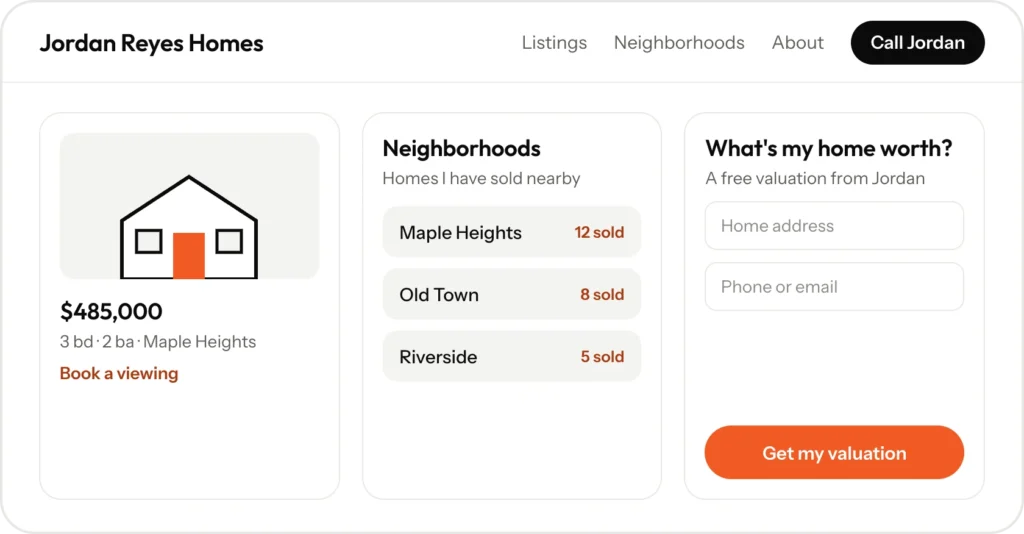
Give each area you serve its own page. Say what it is like to live there, the types of homes, nearby schools and amenities and the homes you have sold there. These pages prove local knowledge to sellers. They also help you show up when people search for homes in that neighborhood.
A home valuation page
The other agent’s site had a short “What’s my home worth?” form. It turns curious homeowners into seller leads. You get an address and contact details, then follow up with your own valuation.
Keep it short. An address, a name and a phone number or email are enough to start a conversation.
An about page with proof
Sellers are choosing a person, not a brokerage. Show your recent sales, how long you have been in the business and reviews from past clients. Only use numbers and quotes you can stand behind.
Reviews and contact options
Put reviews where people decide: near the contact button and on the valuation page. Then make contact easy, with a click-to-call button on every page, a short form and a way to request a showing.
Key point: Every page should answer one question a buyer or seller has before they call.
Pages earn trust. A few features turn that trust into a phone call.
What turns a visitor into a call?
Picture a buyer standing outside one of Jordan’s listings on a Saturday afternoon. She wants to see inside. What happens next depends on the website in her hand.
- Click-to-call on every page, so she can reach Jordan in one tap.
- Showing requests that go straight to Jordan, not to an office line.
- Lead tracking, so Jordan knows which leads came from her website and which pages produced them.
- CRM connection. A CRM is the software agents use to manage contacts and follow-ups. Website leads can go straight into most real estate CRMs, so nothing sits forgotten in an inbox.
Before any of this goes live, though, there is one conversation to have with your broker.
What details do brokerages and MLSs ask for?
Real estate advertising comes with rules. Depending on your state, your brokerage and your MLS, your website may need your brokerage name, your license number and the Equal Housing Opportunity logo. IDX listings usually come with display rules of their own.
The details vary, so check with your broker before you launch rather than after. It takes one email, and it saves a rebuild.
How does a real estate agent website get found?
Jordan’s couple found her by name. Most buyers and sellers start with a broader search, like “realtor near me” or “homes for sale in” their area. Local SEO is the work that puts you in those results and on Google Maps.
That means a page for each neighborhood you serve, and a Google Business Profile with your areas, photos and reviews. It also means details that match on Zillow, Realtor.com and local directories. Our guide on how to get your business on Google Maps walks through the profile side.
Rankings usually build over 2 to 3 months, depending on your competition. Asking for a review after every closing keeps the profile moving.
Key point: Neighborhood pages do double duty. They convince sellers and they bring in searches.
What would Jordan’s website look like?
Put the pieces together and Jordan’s site comes down to six parts.
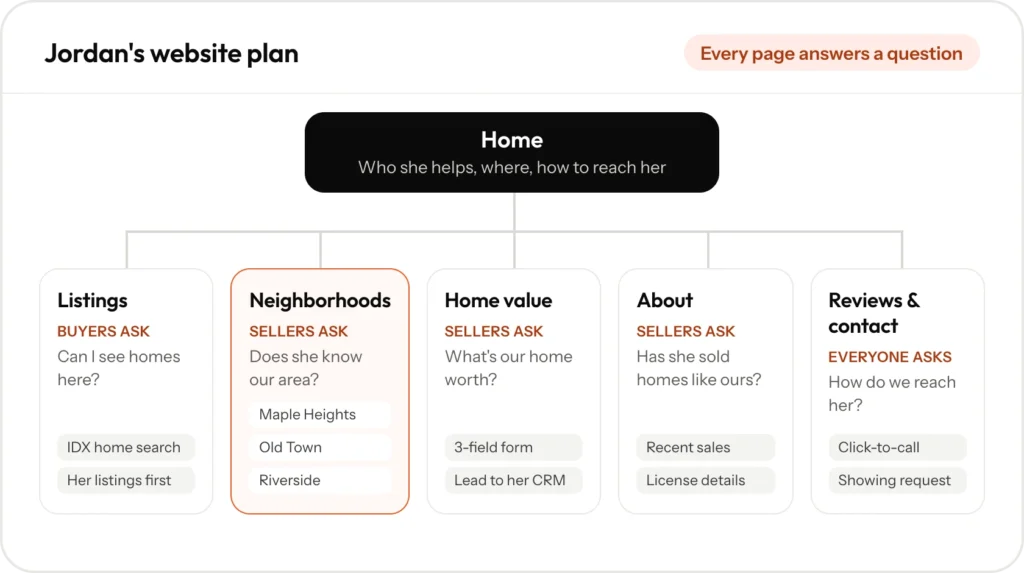
- Home: who she helps, the four neighborhoods she covers, her phone number and a valuation button.
- Listings: an IDX home search, with her own listings featured at the top.
- Four neighborhood pages: one per area, each with homes she has sold there and a short guide to living there.
- What’s my home worth?: a three-field form that sends the lead straight to her CRM.
- About: her story, her recent sales and her license details.
- Reviews and Contact: past clients in their own words, plus a showing request form.
Example
Now replay the search. A neighbor recommends Jordan, and the couple type her name. This time they land on a page about their own neighborhood, with three homes she sold on nearby streets and a button that offers to value theirs.
The referral and the search finally tell the same story.
How much does a real estate agent website cost?
MangoDiv offers two builds, each at one fixed price agreed before work starts. Website Essentials suits newer agents who mostly work by referral. The Presence Build suits agents and developers who want new buyers and sellers from Google, with neighborhood pages, a Google Business Profile, AI search optimization and lead tracking. An IDX feed, if you want one, is billed to you directly by the provider. For a general breakdown, read how much a small business website costs.
See what we build for real estate agents and how we design websites for service businesses. Current prices are on our pricing page, or book a free 30-minute call and we will look at how you show up today.
Frequently asked questions
Yes, through an IDX feed from a provider approved by your MLS. If you do not need a full home search, listing pages you update yourself work well too.
If the domain, hosting and website are in your own name, yes. With MangoDiv they always are, so they move with you.
We write them from what you tell us about each area and the homes you have sold there. You check every page before it goes live.
Yes. Form leads can be sent to most real estate CRMs, so you follow up from the tools you already use.
About 2 weeks for Website Essentials and 3 to 4 weeks for a Presence Build. The launch date is agreed before work starts.